How to Make a Video on TikTok (AI Workflow) | RemotionAI Blog
how to make a video on tiktok · tiktok video tutorial · ai video creator · remotionai guide · tiktok content creation
Learn how to make a video on TikTok using RemotionAI in minutes. Master ideation, AI scripting, voiceovers, captions, and publishing with this complete guide.
Starting from a blank TikTok draft can feel harder than recording the actual video. You need an idea, a script, visuals, voiceover, captions, music, editing, and a caption that helps people find the post. By the time everything is ready, the trend may have moved on.
A reliable workflow removes that friction. You can use an AI video generator to turn a plain-language concept into a structured vertical video, then refine the script, pacing, captions, and branding before publishing. The result is less about chasing a perfect one-off and more about creating a repeatable system for learning what your audience watches, saves, and shares.
From Idea to Published Video in Minutes
A creator may start with a simple thought: “Show three ways an online store can improve product photos.” Traditionally, that idea becomes a notes document, a filming session, a search for b-roll, a timeline full of cuts, and several rounds of caption adjustments. The creative idea often gets buried under production work.
An AI-assisted workflow starts with the message instead. Describe the audience, the topic, the desired tone, and the action viewers should take. The tool can then turn that direction into a script, scene structure, visuals, voiceover, and captions that you can review before exporting.
Build a repeatable production loop
The important shift is from “make one video” to “create several useful variations.” Change the opening hook, example, visual style, or call to action while keeping the central idea consistent. That gives you practical creative tests without rebuilding every asset from scratch.
A consistent schedule matters because publishing cadence affects learning. Buffer's analysis of 11.4 million TikTok posts found that moving from one weekly post to two to five weekly posts produced a 17% lift in views per post. Creators who posted at least weekly for over 20 weeks also saw 450% more engagement per post than those posting fewer than five times in that period.
For visual direction, artist guides for OohYeah can help shape references for mood, composition, and creative style. Use those references to make the prompt more concrete, not to replace a clear marketing objective.
Writing the Perfect Prompt for Your Concept
The strongest output begins with a useful brief. “Make a TikTok about skincare” leaves too many decisions open. A better prompt tells the generator who the video is for, what problem it addresses, how it should feel, and what viewers should see and hear.
Start with the outcome. If the goal is discovery, ask for a fast explanation with a curiosity-led opening. If the goal is conversion, identify the product benefit and include a clear demonstration. If the goal is education, specify the steps and the level of knowledge the viewer already has.
Include the details that control the result
A practical prompt can contain:
- Audience: “Speak to independent café owners who manage their own social media.”
- Message: “Explain how to turn one customer question into three short videos.”
- Tone: “Sound direct, helpful, and conversational, without exaggerated claims.”
- Visuals: “Use close-ups of a phone screen, a content calendar, and a presenter pointing to on-screen examples.”
- Pacing: “Open with the mistake, explain the fix, then finish with a simple action.”
- Format: “Create a vertical TikTok video with readable animated captions.”
This level of direction gives the system a creative boundary while leaving room for useful choices. It also makes revisions easier. Instead of saying “make it better,” you can request a shorter opening, a warmer voice, larger captions, or a different example.
For more detail on structuring prompts for generated video, see this guide to writing an AI video prompt. The key principle is simple: describe the viewer experience, not just the subject.
Optimizing for the TikTok Algorithm and Format
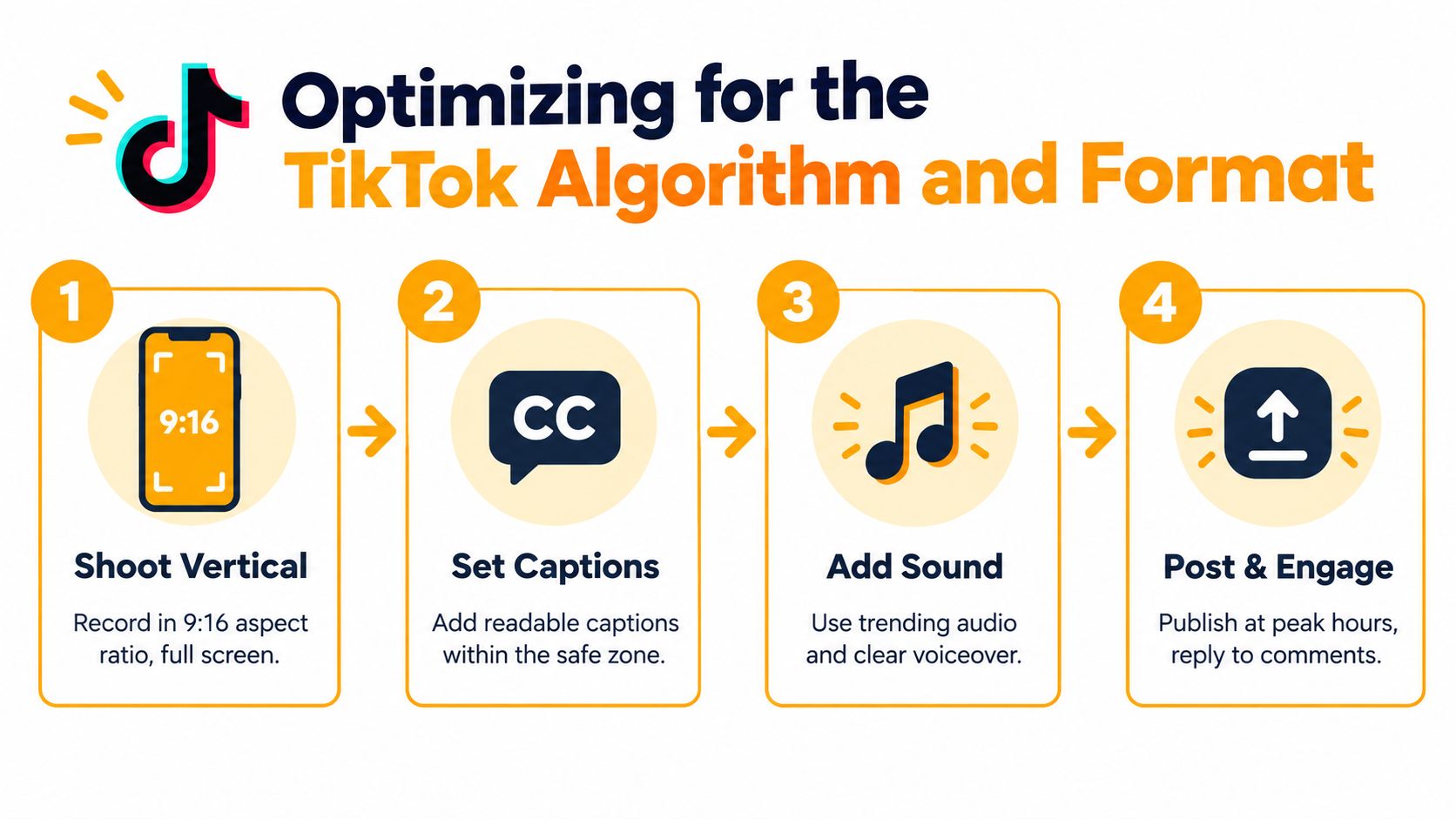
TikTok is built around mobile viewing, so production decisions must begin with the screen. The native format is 9:16 portrait, and 1080 × 1920 pixels is the recommended resolution for a full-screen export, as outlined in this TikTok aspect ratio guide. A wide source forced into a vertical frame often leaves wasted space or crops the subject at the wrong point.
The opening deserves equal attention. Multiple 2026 guidance sources give creators about three seconds to hook viewers, with some recommending an even sharper focus on the first two seconds because watch time and completion influence distribution. Hootsuite's TikTok algorithm guidance also highlights vertical framing and notes that 83.2% of top-performing TikToks use at least 720p resolution.
Match length to the viewer's job
A quick trend reaction may work in 15 to 30 seconds, while an educational explanation may need 60 to 90 seconds, according to recent TikTok video creation guidance. Some top-performing videos run longer, so there isn't a universal runtime. Cut every sentence that delays the payoff, then keep the detail that helps viewers understand or act.
A strong structure usually looks like this:
- Open with tension: Name the mistake, question, or result immediately.
- Show the proof: Use a visual example instead of explaining everything abstractly.
- Deliver the fix: Give one clear method viewers can apply.
- Invite a response: Ask for a comment, save, share, or follow when it fits.
For product-led content, this three-second hook strategy for product teasers offers useful creative direction. You can also refine the opening using this guide to boost TikTok views, while keeping the hook relevant to the actual promise of the video.
Adding Voiceovers and Animated Captions
A video can look polished and still lose viewers if the narration is difficult to follow. Write the voiceover as spoken language, not as a paragraph from a product page. Short sentences, concrete verbs, and deliberate pauses make the message easier to hear and easier to caption.
Generate the voiceover after the script has settled. Choose a voice that matches the audience and subject, then listen for awkward pronunciations, rushed phrases, or emphasis on the wrong word. If the tool supports timing edits, adjust the script rather than forcing the narration to fit an overcrowded scene.
Make captions part of the composition
Animated captions should reinforce the spoken message. Keep them inside the safe area, use strong contrast, and emphasize only the words that deserve attention. Word-by-word animation can create momentum, but excessive movement makes reading harder.
A useful review sequence is:
- Listen without looking: Check whether the explanation makes sense on its own.
- Watch without sound: Confirm that captions communicate the essential idea.
- Preview on a phone: Look for cropped text, tiny type, or visual clutter.
- Check the brand treatment: Adjust font, color, logo placement, and caption animation before rendering.
This guide to adding captions covers the practical setup for synchronized subtitles. Captions support accessibility, but they also give silent scrollers a reason to keep watching.
Final Rendering and Publishing Tips
Before exporting, watch the complete video as a viewer would. The first frame should establish context, the voiceover should match the visuals, and the final call to action should feel like a natural next step. Remove branded intros that delay the point, especially when the viewer hasn't yet received a reason to stay.
TikTok supports in-app recordings from one second up to 10 minutes, while uploaded videos can be up to 60 minutes, according to TikTok length guidance for 2026. Those ceilings don't mean every video should be long. Choose the runtime that lets the idea land without padding.
Run a practical publishing check
- Review the first seconds: Make sure the opening states the tension or benefit quickly.
- Check the export: Confirm the video is vertical, sharp, properly cropped, and free of unwanted borders.
- Write for search: Put the main topic in the spoken line, on-screen text, and caption where it sounds natural.
- Keep the caption focused: Standard creator guidance places the caption limit at 2,200 characters, as explained by Sprout Social's TikTok caption guide.
- Choose relevant audio: Use trending sound when it supports the message, not when it competes with the voiceover.
- Publish consistently: Test a sustainable rhythm, then compare completion, shares, saves, and comments instead of relying only on views.
TikTok benchmark data reports average engagement by views around 4.20% to 4.30% across five consecutive quarters, while another dataset reports a 5.53% average engagement rate, a 52% average watch-through rate, and 68% of impressions from non-followers. Treat those figures as context, not a promise. Your useful signal is which opening, length, and format performs best for your audience.
RemotionAI turns a plain-language idea into a platform-ready video workflow with generated visuals, voiceovers, synchronized animated captions, editable previews, and MP4 export. Visit RemotionAI to turn your next TikTok concept into a finished draft, then refine it with the audience and format in mind.