Video Voice Over That Sounds Human and Converts | RemotionAI Blog
video voice over · AI voiceover · video captions · voice over tips · social video ads
Learn how to plan, record, and sync a video voice over that feels human. Practical tips on AI voices, captions, tone, and social ad best practices.
You publish a polished short-form video, watch it twice, and still feel something is wrong. The visuals are clean, the cuts are quick, and the offer is clear. Yet the narration sounds slightly artificial, the captions arrive late, and the music competes with the words. On a phone with the sound muted, the message becomes even harder to follow.
That outcome usually isn't caused by the choice between a human speaker and an AI voice. It comes from treating video voice over as a single production decision instead of a connected workflow. The script, voice, edit, captions, accessibility checks, and final mix all need to agree on what the viewer should understand.
Why a Video Voice Over Is a Production Pipeline Now
A voice-over is recorded speech that explains, guides, or adds context to what appears on screen. It has evolved from early broadcast narration into a core technique for film, television, animation, advertising, education, and online video. Spoken-word broadcasting is associated with Reginald Fessenden's landmark voice broadcast in 1900, radio voice-over expanded during the 1920s, and The Jazz Singer demonstrated the commercial potential of synchronized speech and music in 1927. Disney's Steamboat Willie followed in 1928, with Walt Disney voicing Mickey Mouse, helping establish character voice performance as a defining storytelling device. (Voice-over history)
That history matters because a modern creator isn't adding a novelty to a video. They're using a mature audiovisual technique that has always depended on coordination between speech and picture. A social ad can fail even when the voice itself sounds pleasant if the narration names the wrong feature, the captions split sentences awkwardly, or the visuals change before the spoken idea lands.
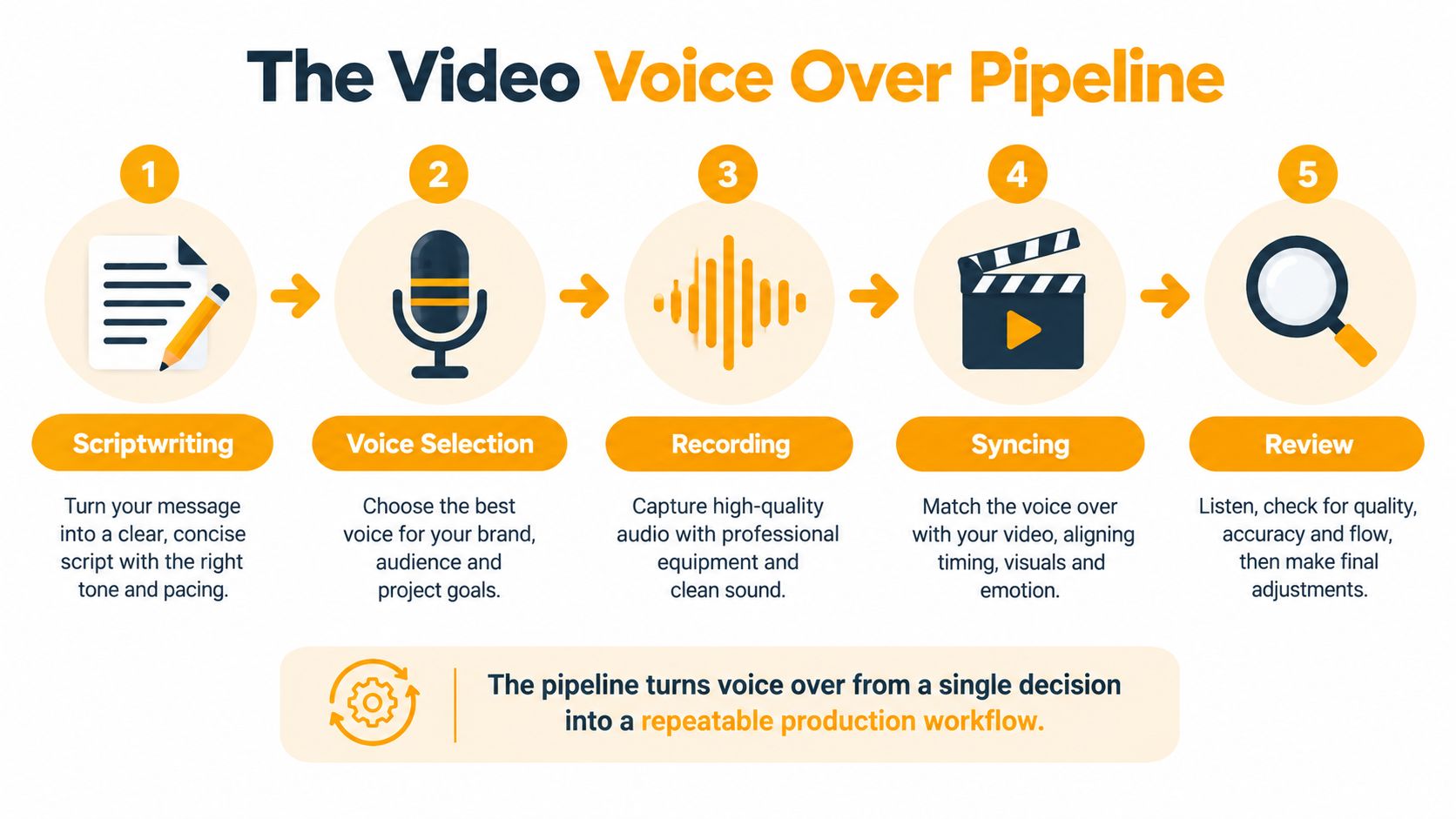
The five handoffs that determine quality
A reliable pipeline has five practical handoffs:
- Scriptwriting turns visual claims into language that can be understood by ear.
- Voice selection matches tone, pronunciation, pace, and audience expectations.
- Recording creates a clean, reviewable performance.
- Syncing aligns phrases, visual events, captions, and music.
- Review checks comprehension, accessibility, pronunciation, and loudness.
The recording isn't finished when a waveform exists. It's finished when the spoken words, captions, visuals, and audio levels tell the same story. That distinction becomes especially important for multilingual distribution and accessibility. Voice-over complements captions, rather than replacing them, because spoken narration helps some viewers while captions preserve access when audio is unavailable or when viewers are deaf or hard of hearing. The World Health Organization estimates that more than 430 million people require rehabilitation for disabling hearing loss, making accessible media practices relevant far beyond compliance. (WHO context and audiovisual accessibility)
Recording Versus AI Voices and How to Decide
The useful comparison isn't “human good, AI bad.” It's a production decision based on control, volume, revision frequency, and authenticity.
Hiring a voice actor gives you direction in real time. You can ask for less polish, more urgency, a different regional character, or a revised emphasis without rewriting the entire process. A skilled performer also handles ad-libs, emotional restraint, and context that isn't obvious from punctuation. The trade-off is scheduling, session management, and a recording that can be expensive or awkward to revise when the script changes.
Recording yourself gives you ownership and immediacy. It works well for founder-led content, internal communications, tutorials, and products where personal familiarity matters more than broadcast polish. A quiet room and a modest external microphone can produce a usable result, but consistency across repeated episodes takes practice.
AI voices, including tools such as ElevenLabs, are useful when you need fast drafts, many variants, or frequent copy changes. They keep a voice consistent and make it easy to replace a sentence without booking another session. They still need supervision. Proper nouns, brand names, acronyms, long numbers, multilingual names, emotional restraint, and emphasis can all expose an artificial read.
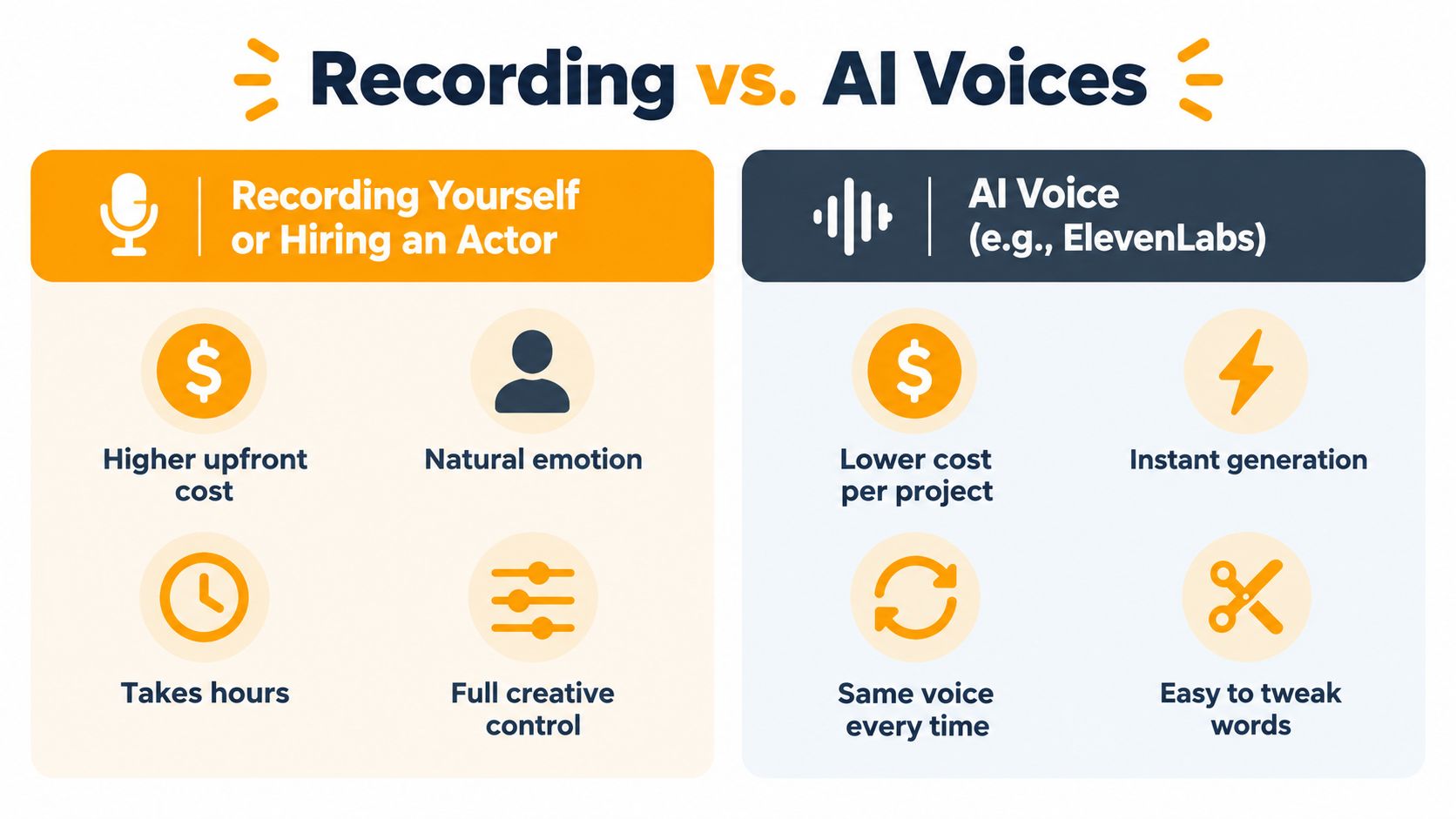
Practical rule: Use AI for speed and iteration, but reserve human direction for meaning, pronunciation, and high-stakes creative work.
A hybrid workflow is often the sensible middle. Generate a rough AI track while the edit is still changing, then commission or record the final read once the script and timing are stable. If you're evaluating AI-assisted copy and want to keep the surrounding presentation natural rather than formulaic, this guide to bypass AI content detectors offers useful editorial context, though it doesn't remove the need for human review.
For a production system that combines generated narration with scene timing and captions, compare the practical workflow described in AI voice-over for videos. The important question isn't which tool sounds most impressive in isolation. Ask whether you can correct a mispronounced product name, change a sentence without breaking timing, and keep the same voice across the campaign.
Writing and Recording the Narration So It Sounds Human
Most artificial-sounding voice-over starts on the page. Long written sentences, vague transitions, stacked product claims, and punctuation that doesn't reflect speech will make both a human and an AI performer work too hard.
Write for the ear. Use short clauses, explicit transitions, and one clear idea per breath. Replace a dense sentence such as “Our platform helps growing teams create, manage, and distribute branded content across multiple channels” with a sequence that gives the listener somewhere to land: “Create the video. Keep the branding consistent. Publish it everywhere your audience watches.”
Prepare the words before choosing the voice
Mark every word that could be misread:
- Proper nouns: Add a phonetic spelling for company, product, and place names.
- Acronyms: Decide whether the letters should be spoken individually or as a word.
- Numbers: Rewrite figures in the form you want the performer to say.
- Multilingual names: Ask a native speaker to review pronunciation rather than trusting a default voice.
- Emphasis: Underline or annotate the word that carries the claim, contrast, or call to action.
Then read the script against the planned visual events. If a product demonstration needs time to show a feature, don't force the sentence into a shorter cut because the edit was locked first. Leave room for a natural pause after the benefit and before the call to action.

Record for clean choices
If you record yourself, test the room before committing to a full take. Listen for fans, reflections, desk vibration, mouth noise, and inconsistent distance from the microphone. Capture a short sample, listen on headphones, and correct the setup before recording the full script.
Don't chase a “perfect voice.” Aim for clear pronunciation, steady pacing, and a tone that matches the message. A smile can lift a friendly read, but forced enthusiasm makes product advertising sound insincere. For practical voice-over audio editing advice, focus on editing decisions that preserve natural pauses instead of removing every breath.
A useful preparation sequence is simple:
- Write the sentence so it can be spoken naturally.
- Mark pronunciation and emphasis.
- Read it against the visual timing.
- Generate or record a test.
- Correct the words before you build the final captions.
The guide to how to do a voice-over is useful when you need a repeatable version of this process for recurring content.
Syncing the Voice Over to the Edit
Once the narration exists, don't automatically cut the audio to fit a finished sequence. Let the spoken phrase determine where the visual event lands. A hand reaching for a product, a chart appearing, or a screen transition should happen when the listener reaches the relevant idea, not merely because the original shot was a convenient duration.
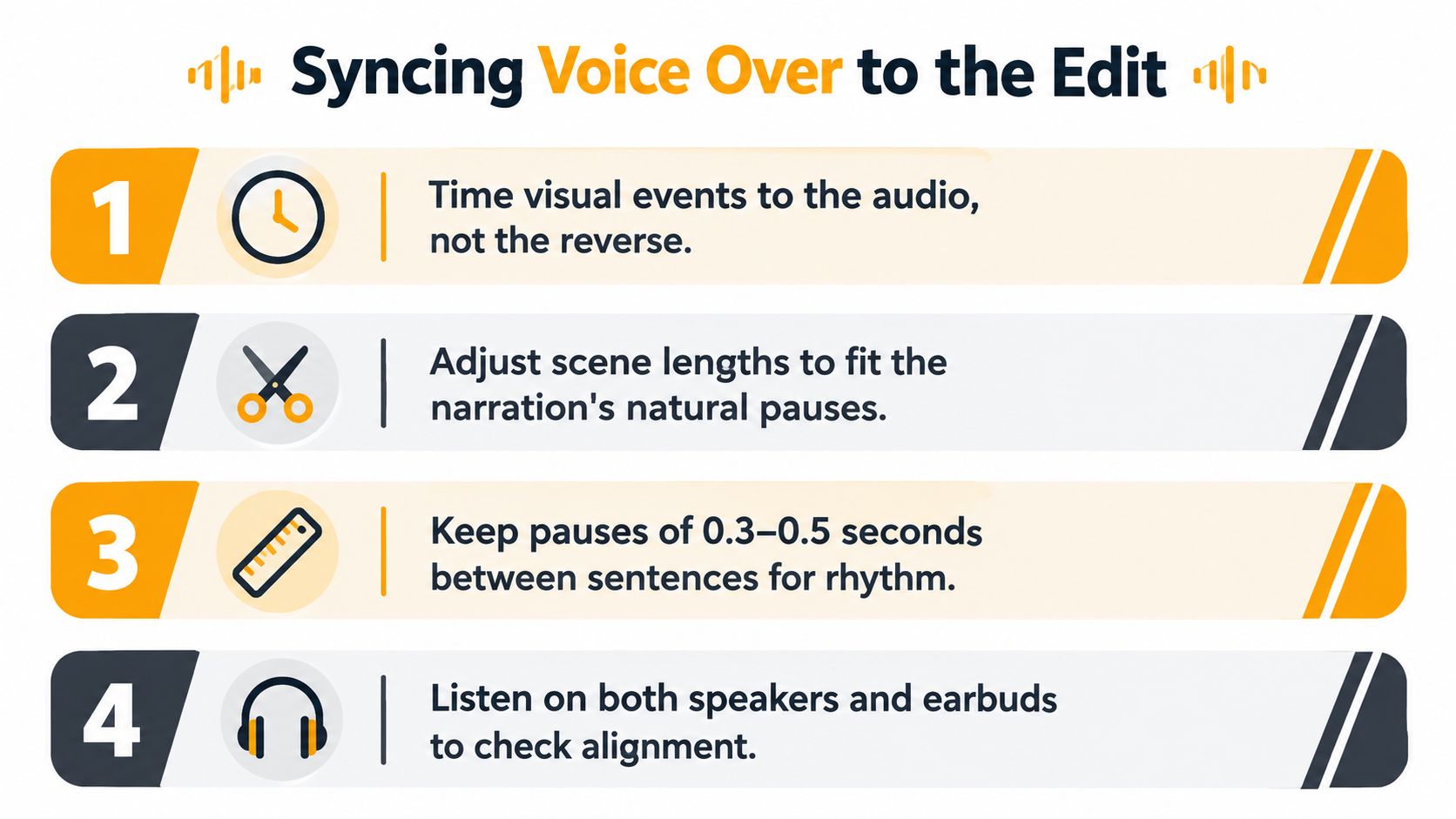
Build the mix around speech
Start with the final approved narration. Align scenes to the actual recording, then generate word-level captions from that final audio. Caption timing based on a draft script will drift as soon as the performer changes a pause, pronunciation, or sentence ending.
Music should support the voice, not compete with it. Duck the bed beneath spoken phrases, restore it briefly between ideas, and inspect the densest speech section rather than judging the mix only at the end. Common mistakes include normalizing peaks instead of perceived loudness, compressing so heavily that breaths and sibilance become distracting, and timing visuals before pronunciation corrections are complete.
For broadcast-oriented delivery, EBU R128 specifies approximately −23 LUFS integrated loudness, with a short-form maximum true peak of −1 dBTP and generally about ±0.5 LU from target. (EBU R128 specification) These figures are useful reference points even when the final destination is a social platform, because perceived loudness and true-peak control reduce level jumps and clipping after transcoding.
Preview before the final render
Render a low-resolution timing preview first. Check whether each visual has enough time to register, whether captions appear with the phrase they represent, and whether the music drops cleanly under speech. Only after those checks pass should you render the final 1080p asset.
For a focused workflow around alignment, the practical guide to syncing audio and video is a useful reference. The fix for most sync problems isn't a more elaborate transition. It's usually a shorter sentence, a longer scene, or a pause restored where the edit removed it.
Captions That Actually Comprehension and Compliance
Captions have two jobs. They help viewers understand the message, and they provide an accessibility layer for people who can't hear the audio or encounter the video in a noisy environment, with muted autoplay, an unfamiliar accent, or non-native speech.
A controlled social-video study involving 202 participants reported a 62.28% correct response rate for the captioned-video group, compared with 45.45% for viewers without subtitles. The reported differences were statistically significant for the tested measures, including p=.029 and p=.039. (Captioned-video comprehension study) The practical lesson is not that captions guarantee performance. It's that captions can change whether viewers correctly understand what the video says.
Time captions to meaning
Transcribe the approved narration, correct punctuation and speaker labels, and break captions at syntactic boundaries. Literal word-by-word segmentation creates a choppy reading experience, while a caption that appears before the voice establishes its referent forces the viewer to guess.
Use this review sequence:
- Audio pass: Listen without looking at the screen and verify every spoken word.
- Mute pass: Turn off the audio and confirm that captions carry the essential message.
- Mobile pass: Review the captions at the intended vertical or horizontal aspect ratio.
- Content pass: Check that text doesn't cover a face, product claim, chart, or key interface action.
For prerecorded synchronized audio, WCAG 2.2 Success Criterion 1.2.2 requires captions unless the video is clearly labeled as a media alternative for text. Captions must include meaningful non-speech audio, such as an alarm, doorbell, laughter, or informative music, not only dialogue. (W3C captions guidance)
Treat burned-in captions and platform-generated captions as separate choices. Test both when platform behavior affects readability or accessibility, and don't assume that a polished narration makes caption review unnecessary.
What Must Be Spoken Versus What Can Stay on Screen
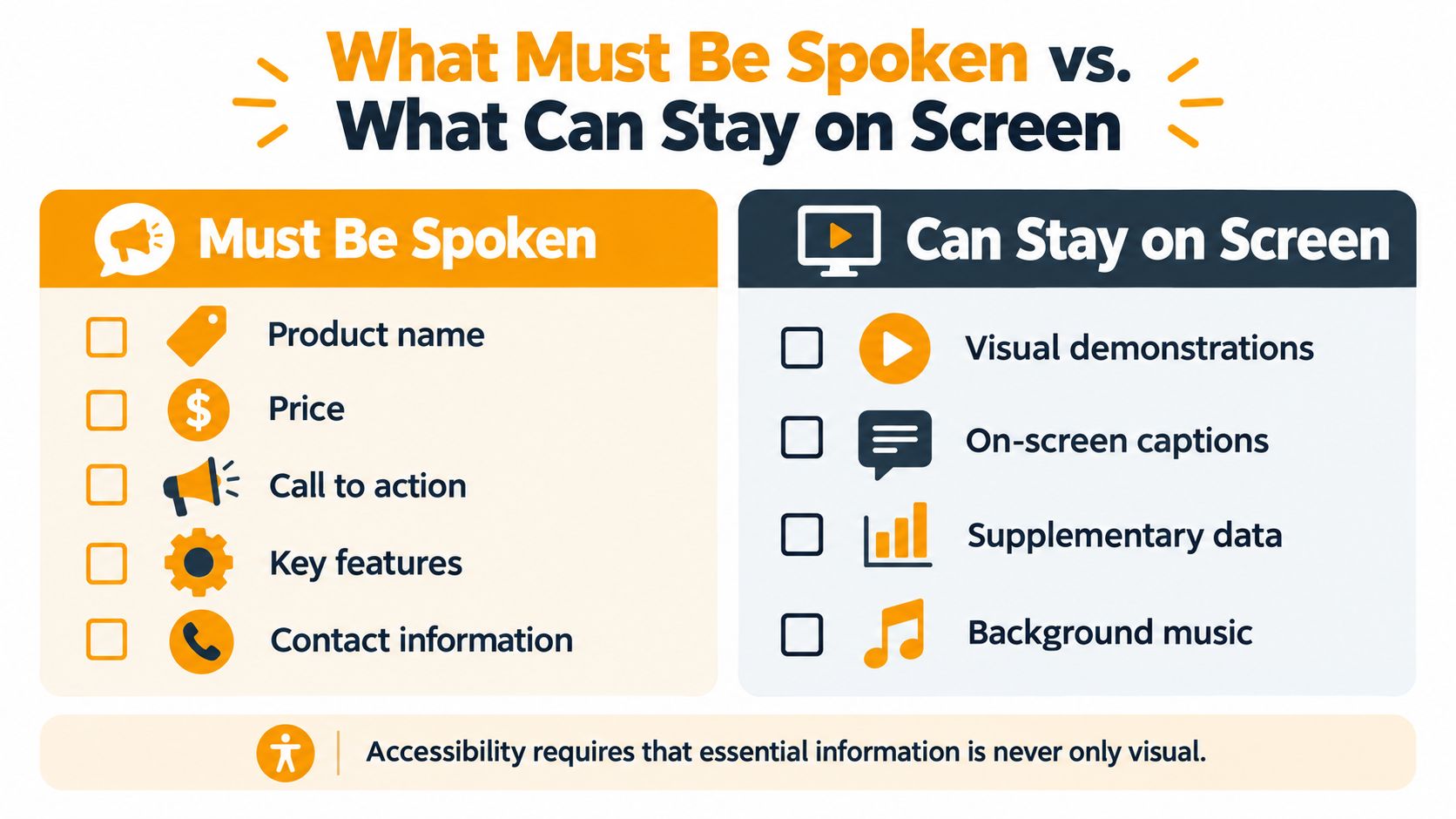
A voice can sound excellent and still leave important viewers behind. If the narration says “our new product” while the product name, price, key benefit, or call to action appears only visually, a blind or low-vision viewer may miss the commercial point. Google's accessibility guidance specifically highlights the problem of voice-overs omitting audible brand names and product descriptions that appear on screen. (Google accessible advertising guidance)
Classify every meaningful scene element before recording:
- Must be spoken: Brand name, product name, price, key benefit, essential feature, and call to action.
- Should be captioned: Supporting copy, secondary details, spoken dialogue, and meaningful sound cues.
- Can remain decorative: Background motion, purely visual styling, and music that carries no informational meaning.
This is not the same as adding an audio-description track. W3C defines described video as narration of key visual information, including actions, scene changes, on-screen text, charts, graphs, speaker names, and titles. The description must fit into available pauses without obscuring essential dialogue. (W3C audio description guidance)
A normal marketing script may explain the offer while saying nothing about the chart, product label, or visual demonstration. If the visual carries meaning, either speak it in the main track or create a deliberate audio-description layer.
The Pre-Render Checklist That Saves Every Cut
Before rendering, run the same short QA pass:
- Loudness: Measure integrated loudness, short-term loudness, and true peak during the densest speech section.
- Pronunciation: Spot-check every proper noun, acronym, multilingual name, and number.
- Audio only: Listen without visuals and confirm that the message remains understandable.
- Muted video: Turn off audio and check whether captions communicate the essential claim.
- Accessibility: Confirm that the brand, product name, price, key benefit, and call to action aren't only visual.
- Device test: Listen on headphones and phone speakers, then review captions on the final mobile layout.
The target isn't a flawless voice. It's a video that still works on a phone, in a noisy room, with sound off, and for viewers who don't speak the original language.
RemotionAI combines script-driven AI voice-overs, synchronized audio, background music, and animated word-by-word captions in platform-ready video workflows. Use RemotionAI to generate and refine short-form videos, then apply the audio-first checklist above before publishing to TikTok, Instagram, YouTube, or your next campaign.